
COURSES: Object Oriented Programming - C++
Instructor: Dr. Guang Zheng, Dr. Shuzhuang Feng
Email: zhengguang@nju.edu.cn
C/C++ IDE/Complier tools:
1. Visual Studio Express (free download)
2. Eclipse CDT (C/C++ Development Tooling) (free download)
3. Code::Blocks- Opensource (free download)
4. GCC Complier (free download)
5. MinGW (free download)
6. Microsoft DreamSpark (website)
How to learn C++ programming?
LEVEL - 1: (C++)
1. Essential C++, by Stanley B. Lippman
2. C++ The Core Language, by Doug Brown, Gregory Satir
3.The Complete C++ Training Course, 4th Edition, by Harvey M. Deitel, Paul J. Deitel
4. C++ How to Program (Early Objects Version) (9th Edition) (Deitel, How to Program), by Paul Deitel, Harvey Deitel
5.Standard C++ Bible, by Al Stevens, Clayton Walnum
6. Thinking in C++, by Bruce Ecker
7. C++ Primer (5th Edition), by Stanley B. Lippman, Josee Lajoie, Barbara E. Moo.
8.The C++ Programming Language: Special Edition (3rd Edition), By Bjarne Stroustrup
LEVEL - 2: (C++/ OOP)
1. More Effective C++: 35 New Ways to Improve Your Programs and Designs, by Scott Meyers
2. Effective C++, Effective C++: 55 Specific Ways to Improve Your Programs and Designs, by Scott Meyers.
3. Exceptional C++: 47 Engineering Puzzles, Programming Problems, and Solutions, by Herb Sutter
4. More Exceptional C++: 40 New Engineering Puzzles, Programming Problems, and Solutions. by Herb Sutter.
LEVEL - 3: (C++ Object Model)
1. The Annotated C++ Reference Manual, by Margaret A. Ellis, Bjarne Stroustrup
2.Inside the C++ Object Model, by Stanley B. Lippman
LEVEL - 4: (C++/ Patterns)
1. Design Patterns: Elements of Reusable Object-Oriented Software, by Erich Gamma
2. Modern C++ Design: Generic Programming and Design Patterns Applied, by Andrei Alexandrescu
Generic programming / STL:
1. The C++ Standard Library: A Tutorial and Reference, by Nicolai M. Josuttis
2. Generic Programming and the STL: Using and Extending the C++ Standard Template Library, by Matthew H. Austern
3. The C++ Standard Template Library, by P.J. Plauger, Alexander A. Stepanov, Meng Lee, David R. Musser.
VTK-DEMO CODES:
(1) VTK_C++ Demo code ( visual.txt, twotree.txt, CMakeLists.txt)
(2) VTK source code (download)
(3) CMake application (download)
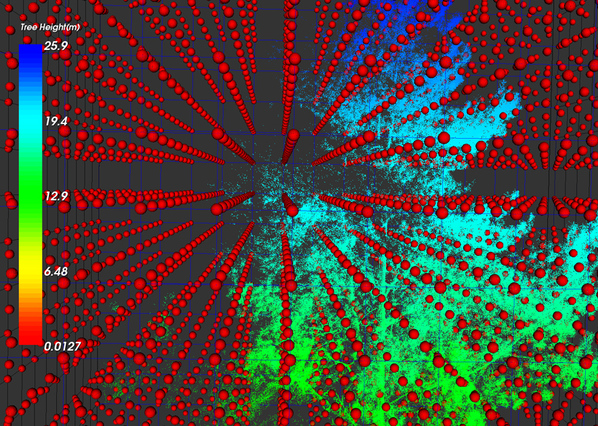
Please follow the instruction ( VTKInstruction.pdf) step by step to configure the running environment carefully. Once you successfully set up the VTK library in your computer, you can go ahead to compile the source demo code using the cross-platform compiler CMake application and attached visual.cxx.file. Finally, you can get the nice 3-D visualization result with the demo point cloud data file named twotree.txt as the following picture:
LAB-1:
(1) Get yourself familiar with and configure the C/C++ development environment in various OS;
(2) Successfully configure your C/C++ compiler;
(3) Lab exercise-1: please write a piece of C code to first get five different integers from input, and then output the smallest one.
(4) Lab exercise-2: please write a piece of C code to first get a ten-digit integer number, and then output the 10 digits with a space as a separator.
(5) Please submit your home work through the submission system.
(6) Yes, you are finished, good job!
LAB-2:
(1). Convert the C-Style code in the previous lab into C++ style code and run the program and get correct output;
(2). Please write a piece of C++ CODE to define a class named “ClassBook”. In this class, several private members should be defined to describe: 1. studentName; 2. studentID; 3. studentBirthYear; In addition, some member functions are needed to manipulate the private members to set their values and input and output;
(3). Good luck!
LAB-3:
(1) Please create a C++ class named Rectangle which contains two private members (i.e., length and width) in float data type with the same default values as 1.0. Two member functions (i.e., ComputePerimeter and ComputeArea) should be provided to calculate the perimeter and area of a given rectangle. In addition, the SET and GET functions should also be given to configure the values of private members. Moreover, the function should be implemented in your SET function to double check if the length and width are valid and ranging from 0.0 to 20.0. Finally, please write your own main function code to see if you get what you want:) Good luck!
(2) Please make sure that you define and implement your class in separate header and *.cpp files, respectively, three files in total (i.e., header files for class definition (*.h); implementation file for class as *.cpp, and your execution file (main.cpp)) should be submitted with the screenshot of your final result, thanks!
LAB-4:
Provide an enhanced TIME class with a new member function named “Tick”, the new Tick function allows increasing one second per time. Please make sure all the data members are always valid. In addition, an execution program should be provided to test the TIME class. The following functions should be achieved:
(1) Print the standard time in each loop to test if the function “Tick” works normally;
(2) Please make sure that you can increase to the next “minute”;
(3) Please make sure that you can increase to the next “hour”;
(4) Please make sure that you can increase to the next “day” (i.e., increase time from 11:59:59 PM to 12: 00:00 AM).
(5) Please make sure that you define and implement your class in separate header and *.cpp files, respectively, three files in total (i.e., header files for class definition (*.h); implementation file for class as *.cpp, and your execution file (main.cpp)) should be submitted with the screenshot of your final result, thanks!
LAB-5:
Please create a sophisticated C++ class named Rectangle, this class stores four Cartesian coordinates of the four corners of the rectangle, the following functions should be achieved:
(1) The constructor calls a SET function to accepts four sets of coordinates;
(2) Verifies that each of these is in the first quadrant with no single x- or y- coordinate larger than 20.0;
(3) Please create a Draw member function to display the rectangle inside a 25-by-25 box enclosing the portion of the first quadrant;
(4) Please provide a setFillCharacter member function to specify the character out of which the body of the rectangle will be drawn;
(5) Please make sure that the setPerimeterCharacter member function is used to specify the character that will be used to draw the border of the rectangle;
(6) Please create a member function named Scale to change the size of the rectangle;
(7) Please create a member function named Rotate to rotate the rectangle around its geometric center about 30 degrees.
(8) Please make sure that you define and implement your class in separate header and *.cpp files, respectively, three files in total (i.e., header files for class definition (*.h); implementation file for class as *.cpp, and your execution file (main.cpp)) should be submitted with the screenshot of your final result, thanks!
(9) Good luck!
LAB-6:
Please create a C++ class named SavingAccount which includes:
(1) a STATIC-TYPE data member named annualInterestRate is provided to store the annual interest for the money-saver;
(2) a private data member of savingBalance is used to store the balance in current bank account;
(3) member function named calculateMonthlyInterest which is used to calculate the monthly interest by multiplying the 'annualInterestRateand then divided by 12 (i.e., the twelve months per year). The calculated interest will be added into the balance of the current saving account;
(4) a static member function named modifyInterestRate is needed to refresh and update the values of annualInterestRate;
(5) A test program should be written to test the functions of the SavingAccount class. Two objects named saver-1 and saver-2 will be defined with the balance as $ 3800 and $2300, respectively. Please set the annualInterestRate as 5.45% and 6.85% to calculate the monthly interest and output the final balance in the next month.;
(6) Please make sure that you define and implement your class in separate header and *.cpp files, respectively, three files in total (i.e., header files for class definition (*.h); implementation file for class as *.cpp, and your execution file (main.cpp)) should be submitted with the screenshot of your final result, thanks!
(7) Good luck!
LAB-7:
This exercise will be an enhanced version of the Lab work from week-4. The main goal of this lab is to learn how to manipulate two C++ classes which one class has been declared as a friend class of the other one.
Please provide two C++ classes named TIME and DAY with a member function named “Tick”, the new Tick function allows increasing one second per time. Please make sure all the data members are always valid. In addition, an execution program should be provided to test the TIME and DAY classes. The following functions should be achieved:
(1) Print the standard time in each loop to test if the function “Tick” works normally;
(2) Please make sure that you can increase to the next “minute”;
(3) Please make sure that you can increase to the next “hour”;
(4) Please make sure that you can increase to the next “day” (i.e., increase time from 11:59:59 PM to 12: 00:00 AM).
(5) Please make sure that you define and implement your classes in separate header and *.cpp files, respectively, five files in total (i.e., header files for class definition (*.h); implementation file for class as *.cpp, and your execution file (main.cpp)) should be submitted with the screenshot of your final result, thanks!
LAB-8:
This exercise is to overload the operator parentheses () operator to allow another form of double array subscripting like: Array [row] [column] for any array of objects, overload the function call operator to allow the alternate form: Array (row, column).
Please create a C++ class named DoubleArray to access the elements of a 5-by-5 matrix A in the form of A (row, column). the operator () should provide the correct pointer operation. In addition, you should provide the functions to correctly overload the operator ==, !=, <<,>> to compare, input, and output the elements of the matrix.
Please make sure that you define and implement your classes in separate header and *.cpp files, respectively, three files in total (i.e., header files for class definition (*.h); implementation file for class as *.cpp, and your execution file (main.cpp)) should be submitted with the screenshot of your final result, thanks!
LAB-9:
In this lab, you need to create a C++ class hierarchy, it contains a base class named Package and two inherited classes named TwoDayPackageand OvernightPackage. In the base class Package, you will need to provide several private data members such as SenderName, ReceiverName, Address, City, Province, ZipCode, Weight, and UnitPrice. A default constructor function should be provided to initialize all data members and make sure that the values of Weight and UnitPrice are positive numbers. A public member function named calculateCost should also be provided to obtain the final price of package delivery.
In terms of the inherited class of TwoDayPackage and OvernightPackage, they should inherit all functions of base class Package. Two additional data members named TwoDayCost and OvernightCost should be provided and initialized. Moreover, the implementation of member functions calculateCost in each inherited class should be updated accordingly by adding the TwoDayCost and OvernightCost to the previous costs obtained in the base class Package.
Please make sure that you define and implement both base and inherited classes in separate header and *.cpp files, respectively, seven files in total (i.e., header files for class definition (*.h); implementation file for class as *.cpp for one base class and two inherited classes, and your execution file (main.cpp)) should be submitted with the screenshot of your final result, thanks!
LAB-10:
In this lab, you will need to create a three-layer C++ class hierarchy, it contains a base class named Shape with the virtual member function GetArea. It has a second-layer inherited class named TwoDimensionalObject which contains the virtual member functions of GetArea and GetPerimeter. Moreover, The TwoDimensionalObject has four third-layer inherited classes named Rectangle, Square, Circle and Triangle. For each two-dimensional object, you will need to implement the specific member functions (i.e., GetArea and GetPerimeter) in their own class to obtain the AREA and PERIMETER using correct methods.
Please make sure that you define and implement both base and inherited classes in separate header and *.cpp files, respectively, and create the three-layer class hierarchy. Thirteen files in total (i.e., header files for class definition (*.h); implementation file for class as *.cpp for one base class, one second layer inherited class, four third-layer inherited class, and your execution file (main.cpp)) should be submitted with the screenshot of your final result, thanks!
LAB-11:
This exercise is to write a template-based class to 5*5 MATRIX class. First, it has the ability to accommodate different types of elements such as double, float, char, string, etc.. Moreover, please overload the operator parentheses ( ) to allow accessing an element through the array subscripting like: Array [row] [column], overload the function call operator to allow the alternate form: Array (row, column).
Please create a C++ class named AnyArray to access the elements of a 5-by-5 matrix A in the form of A (row, column). the operator ( ) should provide the correct pointer operation. In addition, you should provide the functions to correctly overload the operator ==, !=, <<,>> to compare, input, and output the elements of the matrix.
Please make sure that you define and implement your classes in separate header and *.cpp files, respectively, three files in total (i.e., header files for class definition (*.h); implementation file for class as *.cpp, and your execution file (main.cpp)) should be submitted with the screenshot of your final result, thanks!
LAB-12:
In this lab, you will need to create a three-layer C++ class hierarchy, it contains a base class named Shape with the virtual member function GetArea. It has a second-layer inherited class named ThreeDimensionalObject which contains the virtual member functions of GetVolume and GetPerimeter. Moreover, The ThreeDimensionalObject has four third-layer inherited classes named Cone, Cylinder, and Sphere. For each three-dimensional object, you will need to implement the specific member functions (i.e., GetVolume and GetPerimeter) in their own class to obtain the VOLUME and PERIMETER using correct methods.
In addition, you will visualize the three 3-D objects in the VTK environment based on the geometric parameters such as diameter and height. Please make sure first successfully set up the VTK running environment by following the instructions provided in the VTK Demo practice.
Please make sure that you define and implement both base and inherited classes in separate header and *.cpp files, respectively, and create the three-layer class hierarchy. Eleven files in total (i.e., header files for class definition (*.h); implementation file for class as *.cpp for one base class, one second layer inherited class, three third-layer inherited class, and your execution file (main.cpp)) should be submitted with the screenshot of your final result, thanks!
Here is the reference code for VTK Cube visulization: https://examples.vtk.org/site/Cxx/GeometricObjects/Cube/